


This is Episode 2 of The Vibe Coder’s Guide to the Machine: computer science for a new generation.
Say you have asked an AI for a small app to share files with a couple of friends: upload, list, download, delete. You upload a long video, start downloading it in one browser tab, and while the progress bar is still crawling you click Delete in another tab, to check that Delete works. It does. The video is gone from the list, and when you look in the app's upload folder on the server it is gone from there too. Then the download carries on and finishes, because the server had already opened the file and keeps reading from what it opened. Every byte arrives, of a video that, by every account you can check, no longer exists.
Nothing broke. The delete did what you asked and so did the download. Delete ended something, only not the thing you thought. It ended a name.
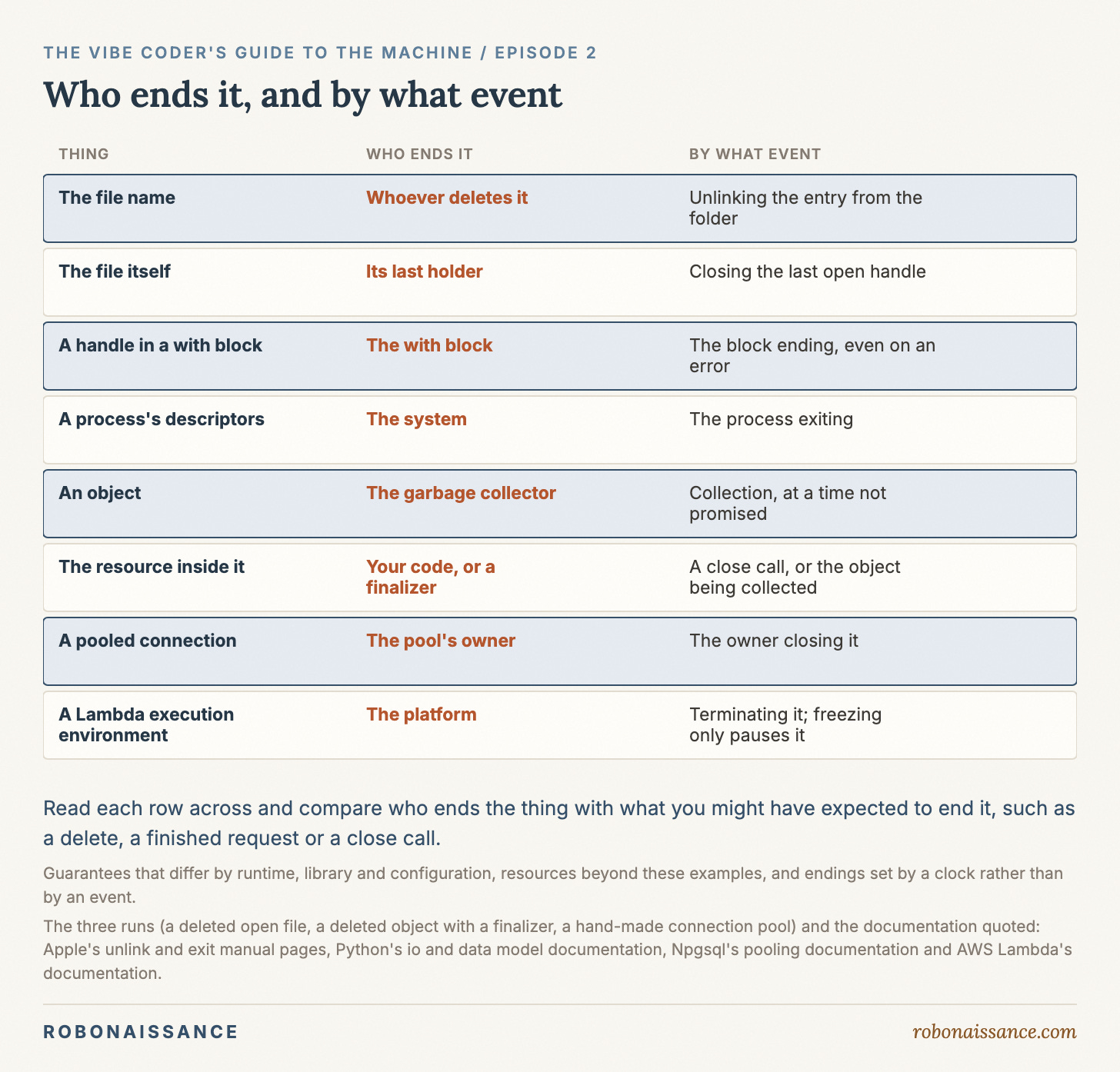
Names and things end separately, and not only for files. Every thing a running program makes has its own ending. A name in a folder, the file behind it, a handle a process holds open (a handle is how a running program holds on to a file it has open), a connection to a database, an object in memory and the process itself are each ended by a particular owner, on a particular event. “It’s deleted”, “the request finished” and “the program is done” each settle exactly one of them. So the question to carry is not whether something has stopped. For each thing, ask who ends it, and by what event.
This was always true. What AI changes is who has to know it. The endings live inside the code that does the work: a block that closes a file, a pool that keeps connections, a cleanup registered for later. When you write that code by hand, you meet each ending as you type it. When an assistant writes it, they arrive inside libraries and services you never read, and the assistant’s “Done, I’ve deleted it” is a report about one of them.
A name and the thing it names
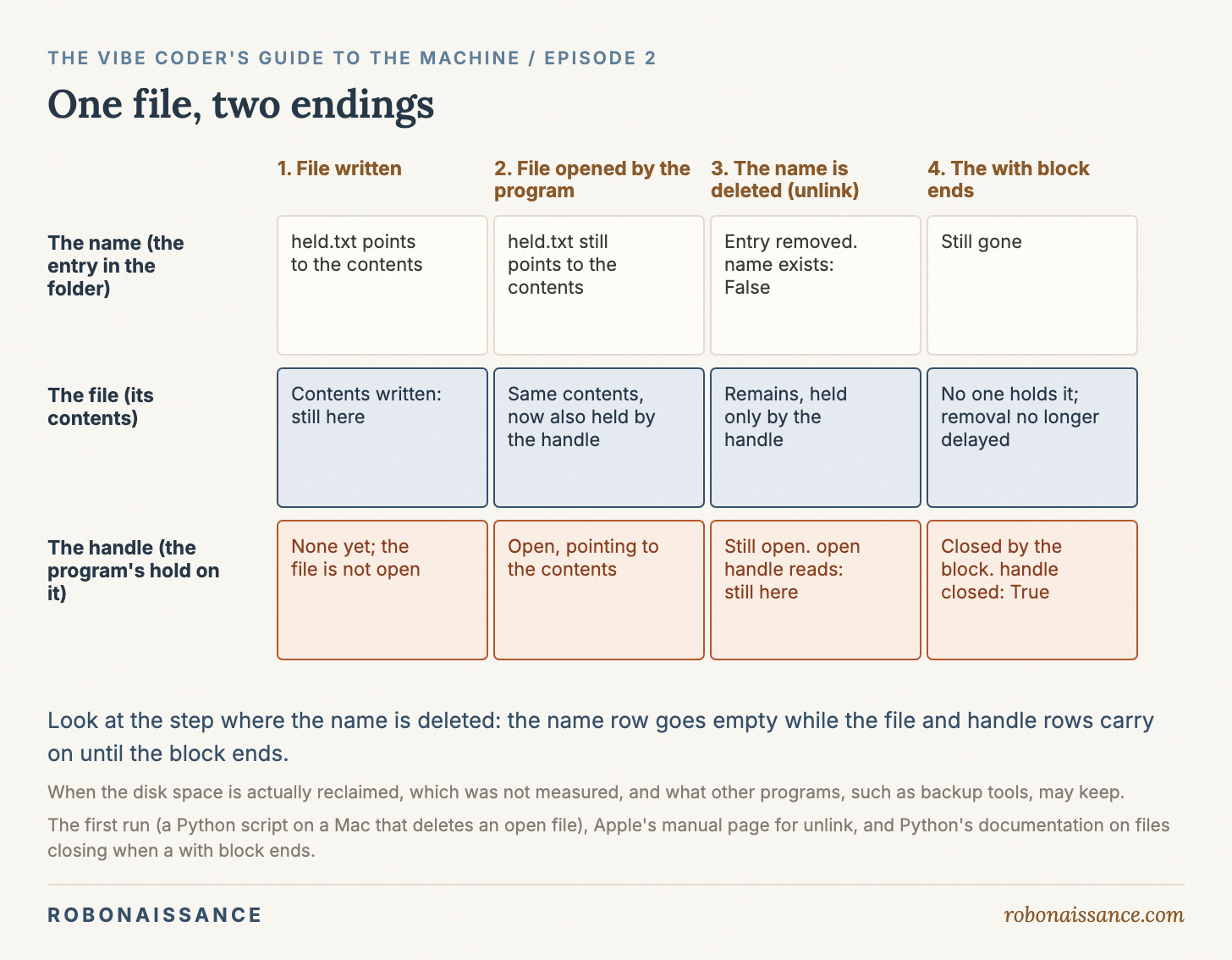
I tried the heart of the opening on a Mac, with Python 3.14 on macOS 26.5. The script makes a small file, opens it, deletes it while it is still open, and then reads from it. The order of the lines is the whole point, so here they are:
with TemporaryDirectory(dir=".") as d:
    p = Path(d) / "held.txt"
    p.write_text("still here", encoding="utf-8")
    with p.open(encoding="utf-8") as f:
        p.unlink()
        print("name exists:", p.exists())
        print("open handle reads:", f.read())
    print("handle closed:", f.closed)
name exists: False
open handle reads: still here
handle closed: TrueThe name was gone, and the file still read “still here” through the handle that had opened it.
A file in a folder has two parts that are easy to think of as one. There is the name, an entry in the folder that points to the file, and there is the file itself, the contents the name points to. Deleting a file removes the entry. Unix calls this unlinking, which is why Python’s method is unlink, and Apple’s manual page for it says what happens when someone is still reading: “If one or more process have the file open when the last link is removed, the link is removed, but the removal of the file is delayed until all references to it have been closed.”
The reason is that the name and the file have different holders. The folder holds the name. Any process that has opened the file holds the file. Delete takes away the folder’s hold and nothing else, so the file lasts exactly as long as anyone else still has it open. In the script, the last holder was the inner with block. When it finished, it closed the handle, and Python’s documentation promises that a file is closed when its with block ends “even if an exception occurs”. With no one left holding it, the manual page’s delayed removal could go ahead. The run shows the name going and the handle closing, and the manual page describes what follows.
In the file app, the difference shows up as two different requests. The upload request created the video. The download request was holding it when you clicked Delete. The creator had no say in the ending at all; the holder did. The video truly ended when the download request closed its handle, an event you never saw, caused by code you never read, some seconds after the moment you would have called it deleted.
Three things that are easy to call done
The life of a process has a beginning, a stretch of running and an end. Inside that life, three quite different things all get called “done”, and keeping them apart is most of what process lifecycle means in practice.
The first is a task completing: a request is answered, a function returns, a with block reaches its last line. The process carries on, and the task’s ending settles only what the task itself arranged to settle. The second is the process exiting, the end of the whole running instance. The third is a resource being released: something the program held, an open file, a connection, a lock, is actually given up, so that it can disappear or someone else can have it. These three can happen at the same moment, and often do, which is why they blur. They can also happen hours apart, caused by different parties.
Process exit is the big ending, and it is worth knowing exactly how far it reaches. When a process opens a file or a connection, the system hands it a handle, which Unix calls a file descriptor, and keeps a table of those handles for that process. Apple’s description of exit is short and firm: “All of the descriptors that were open in the calling process are closed. This may entail delays; for example, waiting for output to drain.” The reason is ownership. The handles were held through the process, so when the process is gone there is nobody left to hold them, and the system closes them on its behalf.
Read the sentence again for what it does not say. It closes descriptors. It says nothing about names in folders, or about anything a different program is keeping. Take the lock file the AI added to the price bot in the last episode: the bot creates price_bot.lock and refuses to start if that file already exists. The lock is a name in a folder, and the guard never says what removes it. Exit closes descriptors and leaves names alone, so the lock stays where it is after the bot stops unless the bot’s own code deletes it. If it does not, the guard will do exactly what it was written to do, to the next copy, which will be you, trying to start the bot again.
Deleting a name inside your own code
The same split between a name and its thing exists inside a running program, and there it decides when a resource is released.
Code often wraps a resource in an object: a database client, a file, a connection to some service. The object is a value in the process’s memory, and the variable that refers to it is a name. Python’s runtime reclaims an object’s memory once nothing can reach it any more, through a part called the garbage collector. Some objects carry a finalizer, a piece of cleanup registered to run when the object is collected; in the documentation’s words, it is “called when obj is garbage collected.” So there are two ways for the resource inside such an object to be released: your code closes it explicitly, or the object is collected and its finalizer closes it then.
I wrote a small object that opens a file, holds the descriptor and registers a finalizer to close it. Then I made two of them. The first I closed explicitly. The second I simply deleted, with del, which removes the variable, the name. To make the moment hold still long enough to look at, I gave the object a reference to itself, so that deleting the name would not free it at once, and switched off automatic collection, so the collector would not run until the script asked. The deleted object would sit unreachable but uncollected. Then I triggered a collection by hand. Each line of the output answers the same question: is the file closed?
owner alive, resource closed: True
before forced collection: False
after forced collection: True
The first line is the explicit close: the object was still alive and its descriptor was already closed. The object and the resource it holds have separate endings, and the close call ended only one of them. The second and third lines are the deleted one. After del, the name was gone and the descriptor was still open. It closed only when the collector ran.
In an ordinary program, with collection left on, the collector would get round to it at some point. The documentation declines to say when, and permits it never to: “An implementation is allowed to postpone garbage collection or omit it altogether.” It is equally plain about the consequence: “Do not depend on immediate finalization of objects when they become unreachable (so you should always close files explicitly).” That is why objects that hold outside resources usually offer a close method, the documentation explains, because “garbage collection is not guaranteed to happen.”
Set that beside the deleted video and the two runs say the same thing. del removes a name in memory as unlink removes a name in a folder, and in both cases the thing behind the name ends on a different event, caused by a different party. A descriptor in this program has several possible enders: your code, by calling close; the collector, by collecting the object, at a time nobody promises; and the system, when the process exits. Which one actually ends it depends on which gets there first, and only the first is under your control.
Returned is not closed
Ask an assistant to make a database-backed app faster and it may add a connection pool. A connection is a live link between your program and a database. A pool is a small collection of open connections with an owner, usually the application itself, which lends them to requests. A request borrows a connection, uses it, and when it is “closed” gives it back. The point of a pool is that the connection outlives the request.
Python’s standard library has no pool for its sqlite3 module, so I wrote the smallest possible one by hand: a list holding one connection to an in-memory database, and a borrow step that takes the connection out and puts it back afterwards. Each request borrows the connection, adds one row to a table and counts the rows. Then the pool’s owner closes the connection and tries to use it once more. The script’s last line prints only if using the closed connection raises an error, so that printed line is the error being caught.
first request rows: 1
second request rows: 2
available after requests: 1
pool owner closed connection
The first request finished, and the second request found its row. The request’s ending settled nothing about the connection or the data living in it. The connection went back to the pool, still open, and carried the first request’s work straight into the next one. Only when the pool’s owner closed it did it end, and after that the attempt to use it raised the error sqlite3 reserves for, among other mistakes, “trying to operate on a closed Connection“.
There is a second lesson hiding in that code. Each request used the connection inside a with block, just as the first run used the file. A reader would expect the same ending. It is not the same. For a file, the block closes it. For a sqlite3 connection, the block manages the transaction, a set of related changes saved together or not at all, like taking money out of one account and putting it into another, and stops there: “The context manager neither implicitly opens a new transaction nor closes the connection.” The keyword is the same, and the ending is whatever that particular object promises. That is the general rule: an ending belongs to the thing, not to the syntax that seems to end it.
Real pools behave the way the toy does. The documentation for Npgsql, a widely used library for connecting to PostgreSQL, puts it plainly: “closing or disposing a connection doesn’t close the underlying physical connection, but rather returns it to an internal pool managed by Npgsql.” Setting up a connection to a database takes real work on both sides, so a pool keeps a few open and lends them out again and again; “returns it to an internal pool” means the connection goes back into the library’s own collection, still open, ready for the next request. In code an assistant writes, close() can mean “give it back”. The connection itself ends when the pool decides, or when the pool’s owner shuts it down.
Asking the question where there is nothing to list
So far every answer could be checked on the machine: list the folder, read the handle, try the connection. Often you cannot look. Then the same question still has an answer, but it lives in a document.
If an assistant set your database up in a Docker container, the boxed-up environment Docker runs programs in, the data usually sits in a volume, a place where Docker keeps data outside that box, and Docker’s documentation says when that ends: “A volume’s contents exist outside the lifecycle of a given container.” Remove the container and the volume stays; even when nothing is using it, it “isn’t removed automatically.” The documentation gives one exception, and it shows why the question has to be asked of each thing rather than answered once for all of them: an anonymous volume, one Docker named itself, is removed with its container if the container was created with the --rm flag. Some things are cleaned up for you, exactly as far as their documentation says.
The clearest case is a platform that runs your code and never shows you the process that runs it, such as AWS Lambda. You hand it a function, and it calls the function when there is work. Everything here comes from the platform’s own documentation. Your function returning ends one invocation, one call. It does not end the execution environment, the platform’s name for the surroundings it set up to run your code. When the work is done, “Lambda freezes the execution environment”, which means it is paused with its memory intact, not ended, and when the next call comes, “Lambda thaws the environment for reuse.” So whatever was set up before is still there: “Objects declared outside of the function’s handler method remain initialized,” and the contents of the /tmp directory remain while the environment is frozen. So is unfinished work. A callback is code arranged to run later, and background processes or callbacks that had not finished when your function did “resume if Lambda reuses the execution environment.” The documentation’s one instruction to the code follows from that: “Make sure that any background processes or callbacks in your code are complete before the code exits.”
The environment itself ends on the platform’s schedule, not yours: “Lambda terminates execution environments every few hours to allow for runtime updates and maintenance.” That holds even for a function that is called all the time, and the documentation is blunt about it: “You should not assume that the execution environment will persist indefinitely.” Who ends it, then? The platform, by terminating it when it chooses; freezing it after a finished invocation only pauses it until the next call. By what event? The platform’s maintenance. The question did not change when the process list disappeared. Only the place to find the answer moved, from a listing to a page of documentation.
The question, carried
None of this asks you to read every line an assistant writes. It asks you to keep the endings apart when you talk to it and when you check its work. Ask it to list what the code creates or opens, files, connections, processes, temporary folders, and for each one to say what ends it and when. After you stop something, look at more than one thing: whether the name is gone, whether anything is still holding what it named, whether a connection was closed or only returned. When the claim is “it cleans up after itself”, ask which ending that refers to, and where it is written down.
Some things end without anyone ending them at all. A login or a credential can stop being honoured while the code that holds it is still running perfectly happily, an ending set by a clock rather than an event.
The video in the opening ended twice: once when you clicked Delete, and once, unseen, when the download let go of it. Every thing a running program makes is like that. It has an ending of its own, and somebody, or something, causes it.
The Vibe Coder’s Guide to the Machine. You can build it. Now understand it.